Directing your community shouldn't be a full‑time job.
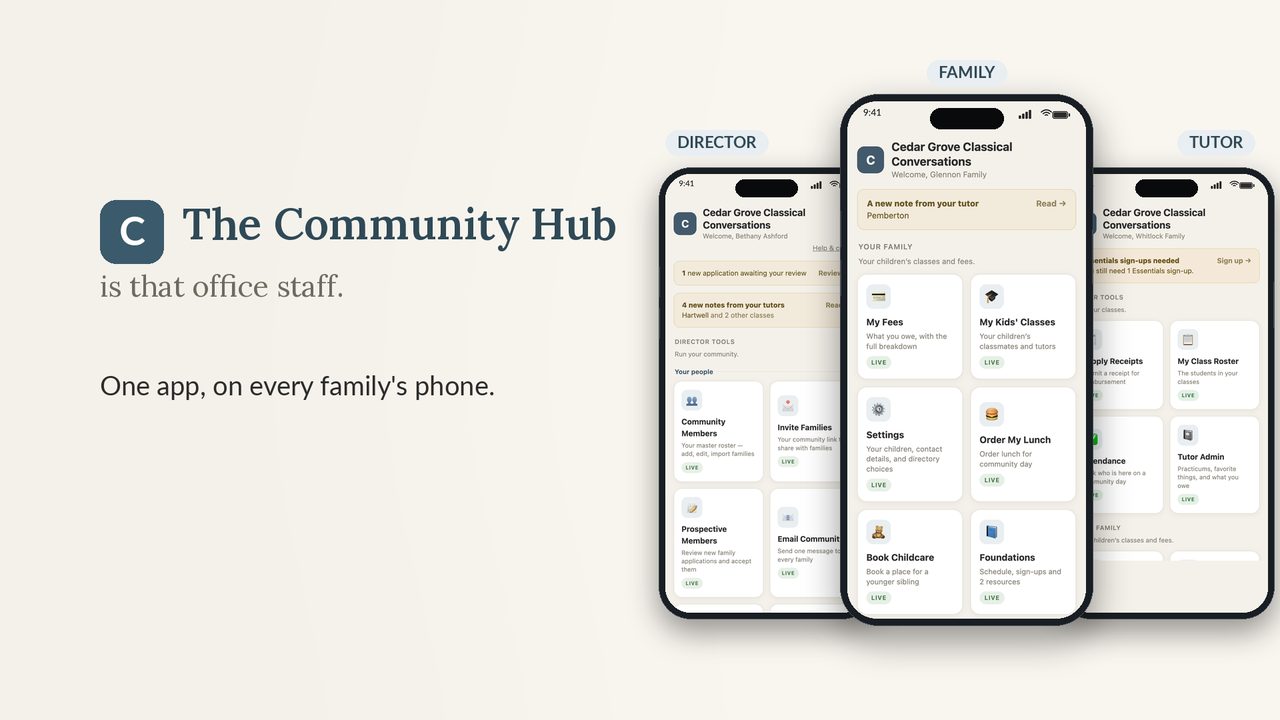
One app for the whole community: applications, roster, fees, community service signups, supply receipts, tutor rosters, calendar, and announcements. Families get a simple login on their own phones. You get your evenings back.
$149 to get set up, with your first month included. Then $29/month or $290/year. Cancel anytime.
- Set up pre-loaded
- Families use it free
- No app store needed
* An independent tool built for CC communities. Not affiliated with or endorsed by Classical Conversations.
 Watch the overview · 2:40
See the whole app in under three minutes, then take the tour yourself →
See it before you sign up
Two ways to look around before you decide.
Watch the overview
Two minutes and forty seconds, start to finish: the application that fills the whole app, fees, attendance, tutor notes, and the year-end rollover.
Watch the overviewTake the guided tour
A self-paced tour of everything a director, tutor, and family sees, on sample data. Go at your own speed.
Start the tour- Director, tutor, and family views
- Sample data only
It has saved my life this first summer as a director. A DREAM tool for managing a CC community. Parents see every fee they owe, tutors submit receipts that auto-deduct from their class budgets, and I can reach any family in a touch. It is invaluable to me, and I am not over-exaggerating when I say it is life changing.
You said yes to directing because you love these families.
Nobody warned you about the rest of it. The roster in one spreadsheet and the fees in another. The receipts waiting in a pile. The volunteer list you rebuild every semester. The same "friendly reminder" text, typed out family by family, again.
The night before community day should be for preparing, not for the bookkeeping.
The administration was never the calling. It just came with it. So let the app carry that part.
The usual way
- Fees tracked by hand across spreadsheets
- Applications on paper or a form that goes nowhere
- Texting families one by one about balances
- Receipts piling up, budgets guessed at
- Volunteer and cleaning lists on paper
- Announcements lost in the group chat
With CC Community Hub
- Every family's fees calculated automatically
- Online applications that build your roster when you accept
- One-tap invoice or reminder by text or email
- Tutors submit receipts by photo, budgets track themselves
- Families claim their own signup slots by phone
- Announcements push a notification to every phone
Running by this weekend, not this semester
A new community doesn't start from a blank screen. It comes pre-loaded with the standard CC programs and fee schedule, a roster template, 21 starter volunteer roles, cleaning tasks, and budget cards. You adjust; you don't build.
Create your community
Your community opens already set up for Foundations, Essentials, and Challenge, with the standard fees, caps, and splits in place. Everything is editable.
Add your families
Upload one roster file and it fills in families, students, program enrollment, and tutors, and sets each family's login for you. Or let your online application form do it as families apply.
Share one link
Families open your community's link, sign in with their name and the last four digits of their phone, and add it to their home screen like any app. No accounts, no app store.
Your application form now builds your roster.
Stop re-typing what families already wrote down. Post one link, and when you accept a family, their whole household lands on your roster with fees already calculated.
Accepting for next year? Accept a family into the upcoming year instead. They stay out of this year's community, and you can invoice their application fee right away.
Everything you juggle, in one place
Every tool below is included. No add-ons, no tiers, no per-family charges. This is the home screen you open to.
Cedar Ridge
Community Members
Your master roster
LiveProspective Members
Review applications
LiveFee Admin
Every family, every fee
LiveReceipt Dashboard
Budgets & reimbursements
LiveDirectory
Names & phone numbers
Announcements
Push to every phone
Calendar
Your whole year
Community Service
Signups & cleaning
Online applications
NewA public application link with your fee schedule and policies built in. Accept a family and the roster, enrollments, and fees create themselves.
Community roster
Upload one roster file or add families by hand. Students, programs, tutors, emergency contacts, and each family's login, all handled for you.
Fees that know CC
Comes set up for Foundations, Essentials, and Challenge, including CC fees, caps, and tuition. Every fee and due date is editable. Add your own additional facility or community fees.
Invoices and reminders
Send a prefilled invoice or reminder for any fee by text or email in one tap. Edit the message before it goes. See what's paid, pending, and past due at a glance.
Supply receipts and budgets
Tutors snap a photo and the receipt lands on your dashboard, categorized by class. When one purchase covers several programs, you can split it across their budgets by percentage. Budgets track themselves.
Community service signups
Starter roles are pre-loaded and editable. Families claim their own slots, and each family only sees the signups that apply to them.
Calendar
A month-grid view of your year. Import your schedule from a calendar file or a template, and attach a printable at-a-glance calendar families can pull up anytime.
Announcements that get seen
Post once and it pushes a real notification to member phones. Need everyone's inbox instead? Email the whole community in one tap.
Start a New Year
When the year ends, download your records as a spreadsheet, then reset for the new year. Keep your roster and setup, or start clean. Next year's families are already waiting.
Tutors carry their share without asking you
Their class roster
Each tutor sees their own students by class, along with any note a parent added, like an allergy the tutor should know about.
Receipts from the field
A tutor buys supplies, snaps the receipt, and picks the class. It's on your dashboard before they leave the parking lot.
Their own tuition invoicing
Tutors can send invoices and track payment for their own students' tuition, without touching anyone else's records.
My Class Roster
Challenge 3 (3)
Sam Carter
Challenge 3 • Carter family
A simple app parents actually use
If a parent can open a text message, they can use this. There is nothing to install from an app store and no account to create.
- Sign in with their family name and the last four digits of their phone.
- See exactly what they owe and when it's due.
- Claim the service and cleaning slots that apply to them.
- See each child's class and leave a note for the tutor.
- Keep their own contact info and children's details up to date.
- Get announcements as real notifications on their phone.
Foster Family
Your fee schedule
Made for how a CC community actually works
General co-op software makes you build your programs, fees, and roles from scratch. This arrives already speaking your language.
This wasn't built in a tech office. It came out of a real CC community, built by a homeschool mom who wanted to save her director from drowning in spreadsheets, receipts, and reminder texts.
One flat price for the whole community
Most directors will charge a small amount to each family to cover the cost.
Getting started
Everyone $149 one timeSetting up the app is simple, and I'm here to help. I'll work with you to make sure your information is uploaded correctly and your community is up and running. After that it keeps itself current: new families come in through your own application link, and accepting one puts her whole household on your roster with fees already calculated. Your first month is included.
- Your families, students, class placements, and tutors in, with every login set
- Your fee schedule, rates, caps, and due dates matched to your community, not just the defaults
- Your community days on the calendar, and your service and cleaning roles
- We go through it together by email, and I fix anything that isn't right
- Your first month on the app, included
Then, 30 days after you join, your plan begins. Pick it when you sign up.
- Cancel anytime
- Every family and tutor included
- All features, no add-ons or tiers
- Download your records anytime
- Cancel anytime
- Everything in the monthly plan
- Covers a full school year, one payment
- Saves $58 against paying monthly
You pay $149 today whichever plan you pick. Nothing else is charged for 30 days.
30-day money-back guarantee. If it isn't right for your community, email within 30 days and I'll refund the setup fee and cancel your plan before it bills.
Good to know
Do families have to pay or download anything?
No. Families use it free. They open your community's link, sign in with their family name and the last four digits of their phone, and can add it to their home screen like an app. No app store, no account setup.
Do I need to be tech-savvy to set it up?
No. A new community comes pre-loaded with the standard CC program fees, a roster template, starter volunteer roles, cleaning tasks, and budget cards. A start-here checklist walks you through your first steps. You upload your roster or add families by hand, and you're running.
How much of the setup do I have to do?
As much or as little as you like. Upload what you can, and I'll work through the rest with you, from the fee schedule and calendar to class placements and service roles, until it matches how your community works. We go through it together by email, and I fix anything that isn't right. Email me if you want to talk it through first.
What am I paying, and when?
$149 on the day you sign up. That covers getting your community loaded and your first month on the app. Thirty days later your plan starts, at $29/month or $290/year, whichever you chose. If it isn't right for your community, email within 30 days and I'll refund the setup fee and cancel your plan before it bills.
Can I change the fees to match my community?
Yes. Every fee, rate, cap, split, and due date is editable, and you can add or rename programs. The defaults just save you from starting at zero.
Does the app collect payments from families?
The app tracks every balance and lets you send prefilled invoices and reminders by text or email, and you can include your community's own payment link. Families pay the way your community already pays, and the app keeps the record straight.
Is my community's information private?
Yes. Each community is its own private space. Families in your community only see your community, and each family only sees what applies to them. The member directory shares only what a directory should. Our privacy policy sets out exactly what is stored, who can see it, and how to export or delete it.
What happens at the end of the year?
Download the year's roster, fees, and receipts as a spreadsheet, then use Start a New Year to roll forward. Keep your roster and setup or start clean, and families you accepted for next year move up automatically.
Is this an official Classical Conversations product?
No. It's an independent tool built to fit how CC communities run. It isn't affiliated with or endorsed by Classical Conversations.
The new CC year is coming.
Set your community up before it starts.
Get your community in and running, with help the whole way. If it doesn't take real work off your plate, you have thirty days to say so and get your money back.
Get your community set up$149 today, first month included · then $29/month or $290/year · cancel anytime
Questions before you start? Email and a real person will answer.